

TWCBet Malaysia App – Mobile Casino, Slots & Sports Betting
The TWCBet Malaysia app is built for players who want a smoother, faster way to access casino games and sports betting on mobile. Instead of jumping between pages in a browser, the app keeps everything in one place: slots, live dealer tables, sports markets, promotions, and your wallet. For Malaysian users, speed and convenience matter especially when you’re checking odds, claiming free credit, or making a quick withdrawal. This guide explains how to download the APK safely, what devices are supported, how installation works on Android, and what iOS users can do to get an app-like experience.
Download TWCBet Malaysia App (APK)
Downloading an APK can be safe when you use the official source and follow basic precautions. The key is to avoid random links and “mirror” files that may be outdated or modified. Always verify you’re downloading the newest release and check the file size and version notes if they’re provided. When you install from the official channel, you’re more likely to receive bug fixes, performance improvements, and updated security features that protect your account and transactions.
Official TWCBet APK Download Link
The safest approach is simple: use the official TWCBet Malaysia site or the official support channel to get the APK. That way you’re installing the original build instead of a copy that might include unwanted changes. If the platform offers a QR code, it can reduce the chance of typing mistakes. After downloading, close any unused browser tabs and proceed directly to installation so the file doesn’t get mixed up with older downloads.
- Download only from the official TWCBet page or verified support channel
- Avoid third-party “APK libraries” and file re-uploads
- Confirm the version number matches the latest release notes
- Keep your device security updates enabled

Minimum Device Requirements
Most modern Android phones can run the app smoothly, but performance depends on memory, storage, and operating system version. If your device is older, the app may still work, but live casino streams and fast odds updates can feel less responsive. A stable internet connection also matters, especially for live dealer games and in-play sports markets where timing is important.
| Requirement | Recommended | Notes |
| Android OS | Android 8.0+ | Newer versions improve stability and security |
| RAM | 3GB+ | Helps with live casino streams and multitasking |
| Storage | 300MB+ free | Allows updates and cached game data |
| Connection | 4G/5G or stable Wi-Fi | Reduces buffering and disconnections |
Latest Version & Update Info
Using the latest version is not just about new games or features it’s mainly about reliability and account protection. Updates often include improvements to login flow, cashier performance, and compatibility with new Android security policies. If you notice slow loading, login timeouts, or games freezing, updating should be the first fix you try. Many apps also allow in-app prompts that tell you when a newer version is available, which is helpful if you don’t check manually.
| Update type | What you usually get | Why it matters |
| Security patches | Stronger protection | Keeps logins and payments safer |
| Performance tuning | Faster loading | Better experience on mobile data |
| Bug fixes | Fewer crashes | More stable live play and bet slips |
| Feature updates | New promos/tools | Easier claiming and navigation |
Why Use the TWCBet Mobile App
Mobile users often choose the app because it feels quicker and more consistent than browsing. An app can store essential preferences, keep sessions stable, and reduce repeated loading of menus. It’s also easier to switch between slots, live tables, and sports betting without losing your place. If you play regularly, the convenience adds up: faster access, fewer taps, and a more streamlined way to manage promotions and withdrawals.

One-Tap Access to Slots, Live Casino & Sports
In the app, the main categories are usually organized for quick entry slots, live casino, sports, esports, promotions, and wallet functions. This matters when you want to move quickly during a match or when a limited-time bonus is active. Instead of searching multiple pages, you can jump straight to your preferred section. Many players also like that the app remembers where they were last, reducing the “start over” feeling that can happen in a browser.
Faster Login & Smooth Navigation
App logins tend to be smoother because the interface is designed specifically for touch screens. Buttons are larger, pages load with fewer distractions, and navigation stays consistent. A stable login flow matters for security too especially if you use verification codes or extra protection features. If you share your phone with family members, you should still log out after each session and avoid saving passwords in insecure places.
Push Notifications for Promotions & Free Credit
Notifications can be helpful when used responsibly. Instead of checking the site repeatedly, you can receive alerts about daily free credit, new deposit offers, or time-limited promos. The best approach is to keep notifications on for promotions only, and disable anything that feels spammy. That way you stay informed without being distracted throughout the day.
How to Install TWCBet APK on Android
Installing an APK is straightforward, but Android requires one extra step: you must allow installation from sources outside the Play Store. This does not mean your phone becomes unsafe it just means you should be careful and only install trusted files. After installation, you can turn the permission off again to reduce future risk. The process below keeps things clean and controlled.
Enable “Install from Unknown Sources”
Android versions label this setting differently, but the goal is the same: allow the browser or file manager to install the APK. You’ll usually find it under Security or Privacy settings.
Enable it only for the specific app you used to download the file (for example, Chrome), then disable it after installation.
- Settings — Security/Privacy — Install unknown apps
- Select your browser — Allow from this source
Step-by-Step APK Installation Guide
A good installation is one where you don’t rush. Read any prompts carefully and avoid clicking pop-ups from unrelated apps. Once installed, open the app from your home screen, then confirm you are on the official interface before logging in.
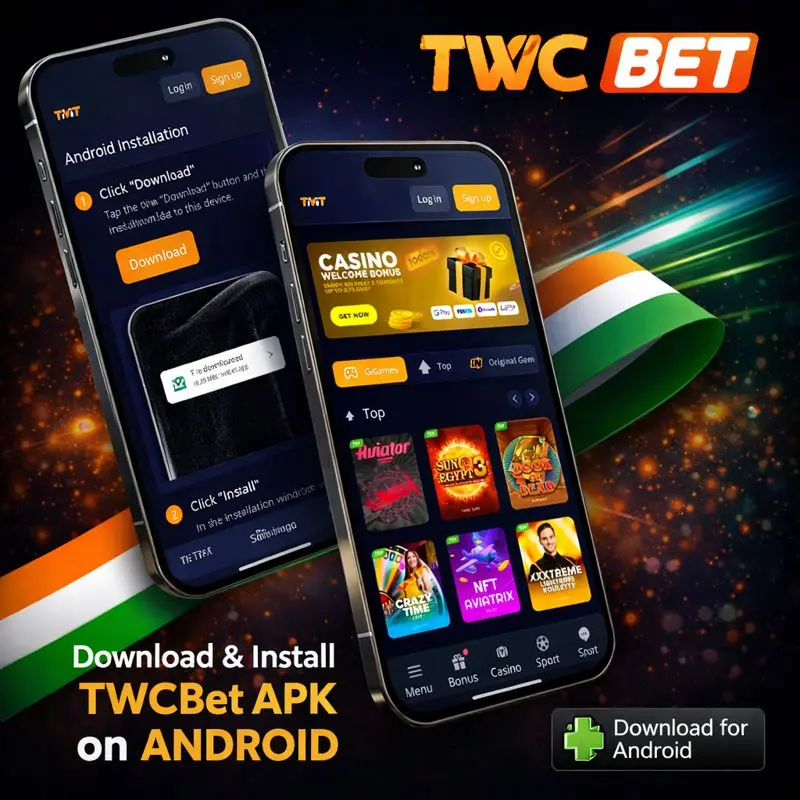
- Download the APK from the official TWCBet source.
- Open your Downloads folder or tap the download notification.
- Approve the installation permission when Android prompts you.
- Tap Install and wait until it completes.
- Open the app and proceed to login.
- Disable “unknown sources” permission again (recommended).
First Login & Account Verification on App
After your first login, you may be asked to confirm your phone number or email. Verification reduces fraud and helps ensure withdrawals go to the correct owner. If you plan to deposit and withdraw frequently, complete your profile early so you don’t run into delays later. Keep your registered details consistent with your payment method details mismatches are a common reason withdrawals get held for manual review.
TWCBet App for iOS Users
Because iOS handles app installation more strictly, many platforms provide a mobile web option that behaves like an app.
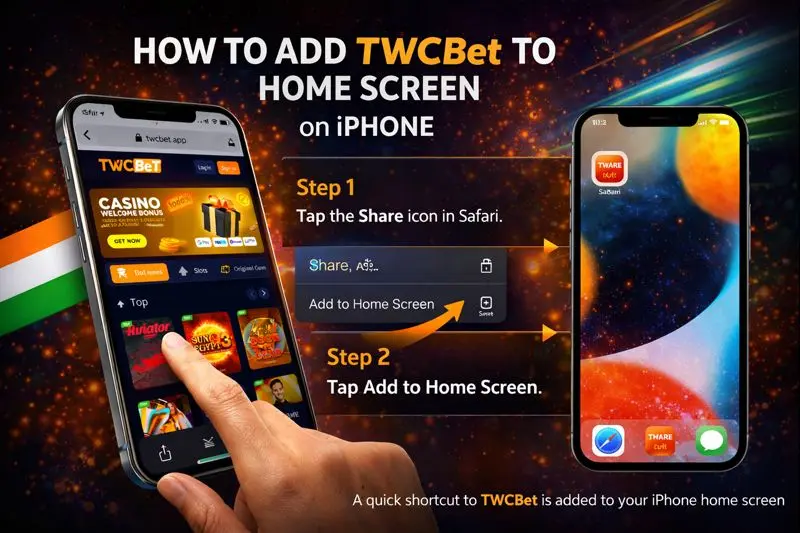
You still get an easy interface, quick access, and an icon on your home screen without an official App Store download. For most iPhone users, this is the best compromise: simple setup, no risky downloads, and a familiar experience.
How to Add TWCBet to Home Screen on iPhone
Adding a website shortcut makes the experience feel closer to a real app. It creates a home screen icon and opens the site in a minimal browser view. This reduces distractions and keeps your sessions focused. The steps are quick and only take a minute.
- Open the official TWCBet site in Safari.
- Tap the Share icon.
- Choose Add to Home Screen.
- Name it (e.g., “TWCBet”) and tap Add.
Browser-Based Mobile Web vs Native App
A native Android app usually feels faster and can support richer features like push notifications. The mobile web option on iOS is still strong for gameplay and payments, but it may rely more on browser performance. If your iPhone is newer, the difference is often small. If you value notifications and ultra-fast switching, Android APK users may have an advantage; if you prefer simplicity and minimal setup, iOS web access is a clean solution.
| Feature | Android APK App | iOS Mobile Web Shortcut |
| Installation | APK install | Add to Home Screen |
| Notifications | Usually supported | Limited/depends on browser |
| Updates | Manual or prompted | Automatic site updates |
| Performance | Very smooth | Smooth, browser-dependent |
Games Available in the TWCBet App
The core reason to use the app is the game lobby on mobile. A good app makes it easy to search games, filter by provider, and load quickly even on mobile data. The TWCBet Malaysia app aims to keep the experience stable whether you prefer quick spins on slots, longer live dealer sessions, or checking odds across multiple sports.
Online Slot Games with High RTP
High RTP slot options appeal to players who want more consistent long-term value. While RTP is not a promise for short sessions, it helps you compare titles. In the app, you can usually view game details, payout information, and features before playing. If you’re managing a budget, combine RTP awareness with volatility, some high RTP games can still be very swingy.
| Slot focus | What it means | Who it suits |
| High RTP + low volatility | Smaller, steadier wins | Casual play, longer sessions |
| High RTP + high volatility | Bigger spikes, fewer hits | Thrill seekers, short bursts |
| Feature-rich bonus slots | More mechanics | Players who like variety |
Live Dealer Casino on Mobile
Live casino on mobile should feel smooth and clear. The app experience helps by keeping streams stable and reducing unnecessary loading. You can typically choose tables by limit, language, or popularity. For best results, use Wi-Fi or strong mobile data, lower the stream quality if needed, and avoid switching between many apps during a live session.
Sports & Esports Betting In-App
In-app sports betting is designed for speed: quick market selection, a clean bet slip, and fast updates. This is especially useful for live betting where odds move quickly. Esports is also a strong fit for mobile because matches run frequently and markets refresh often. The most important habit is to keep your stake sizing consistent and avoid making rushed bets during rapid live changes.

Bonuses & Free Credit in the Mobile App
Promotions inside the app are typically easier to track because they’re displayed in a dedicated section. You can see available offers, opt in, and monitor progress without digging through menus. For Malaysian players, app-based promos are often paired with easier claims and clearer status indicators, which reduces confusion about whether a bonus is active.
Welcome Bonus & Free Credit for New Users
New users may be eligible for welcome packages that include free credit offers. In most cases, you register, verify your account, and then opt in to the welcome promotion. Always read the conditions: wagering targets, eligible games, and expiry dates. If you complete verification early, your first claim and future withdrawals usually become smoother.
Daily Reload & Cashback via App
Reload and cashback offers are designed for regular players. Reload bonuses reward new deposits, while cashback reduces the impact of losing periods. In the app, progress tracking can make a big difference: you can quickly check whether you’ve met a deposit requirement or whether a cashback calculation period has ended.
Exclusive Mobile-Only Promotions
Some campaigns are designed specifically for app users, such as special daily missions, app-only reload rates, or limited-time free credit drops. Mobile-only promos can be valuable, but you should still use them thoughtfully. The best value comes from promos that match your usual play style, not from chasing offers that push you beyond your budget.
| Promo type | How you usually claim | Best use |
| Welcome bonus | Register + verify + opt in | Learn the platform and games |
| Daily reload | Deposit and apply offer | Regular play with control |
| Cashback | Auto calculation or claim | Reduce variance over time |
| Mobile-only offers | In-app opt in | Extra value for app users |
Secure Payments & Fast Withdrawals on Mobile
Payments should be simple on mobile: clear method selection, instant confirmations, and predictable withdrawal steps. The app environment can reduce mistakes because it’s designed around forms and quick verification. Still, you should double-check every number and name, especially with bank transfers. One small error can delay processing, so careful input is always worth it.
Local Bank & E-Wallet Deposit Options
Malaysian players often prefer local bank transfer and popular e-wallet options for speed and convenience. Deposits are typically quick, and many methods provide immediate confirmation. To keep things smooth, use the same method consistently and avoid switching accounts frequently. Save transaction references so support can assist quickly if needed.
| Payment method | Deposit experience | Good for |
| Local bank transfer | Fast confirmation | Familiar, widely used |
| Online banking | Quick steps | Easy for most users |
| E-wallets | Very convenient | Mobile-first deposits |
Withdrawal Processing Time via App
Withdrawal speed depends on review time plus banking transfer time. Reviews can include security checks and bonus completion verification. The app can help by showing status updates and making it easier to submit accurate information. If your withdrawal is delayed, the most common reasons are unfinished bonus rules, mismatched profile details, or additional verification requests.
Data Encryption & Account Protection
Account safety is a combination of platform security and user habits. Even with encryption and protected sessions, you should avoid sharing passwords, never disclose verification codes, and log out on shared devices. If the app offers additional security options, enable them early. Protecting your account also protects your funds and your ability to withdraw without issues.
- Use a strong, unique password
- Never share OTP or verification codes
- Avoid logging in on public Wi-Fi
- Update your device OS regularly
FAQ
Is the TWCBet Malaysia APK safe to install?
It can be safe when you download only from the official TWCBet source and avoid third-party re-uploads. Turn off “unknown sources” after installation and keep your phone updated.
Do I need the app to play, or can I use a browser?
You can usually play through a mobile browser, especially on iOS. The app is mainly for faster access, smoother navigation, and features like notifications.
How do I update the app?
Updates are typically provided through the official download page or via an in-app prompt. Installing the newest version helps fix bugs and improve security.
Can I deposit and withdraw directly in the app?
Yes, most mobile casino apps support deposits and withdrawals. Processing time depends on verification, bonus conditions, and banking transfer times.
What should I do if the app won’t install?
Check storage space, confirm your Android version meets requirements, re-download the APK from the official source, and ensure installation permissions are enabled only for your browser during setup.